


Your marketing campaign just ended. Your boss asks the obvious question: “Which channel drove the most conversions?”
You open Google Analytics. You see traffic from “google,” “facebook,” and “direct.” But which Facebook post? Which email? The campaign that took three weeks to build now looks like a single line item in a spreadsheet — indistinguishable from everything else.
This is the problem UTM parameters solve. They turn vague traffic data into precise campaign intelligence. Instead of knowing that 500 people came from “email,” you know exactly which email, which subject line, and which call-to-action button they clicked.
If you’ve ever wondered what those long strings of text at the end of marketing URLs actually do, this guide will explain everything — what UTM parameters are, how to use them, and how to avoid the mistakes that make your tracking data useless.
What Are UTM Parameters?
UTM parameters are tags you add to the end of a URL to track where your traffic comes from. When someone clicks a link with UTM parameters, that information gets passed to your analytics platform — Google Analytics, HubSpot, or whatever you’re using.
The name comes from Urchin Tracking Module. Urchin was a web analytics company that Google acquired in 2005, which became the foundation for Google Analytics. The UTM system they created became the standard for link tracking across the industry.
Here’s what a URL with UTM parameters looks like:
https://yoursite.com/landing-page?utm_source=facebook&utm_medium=social&utm_campaign=spring_saleEverything after the ? is tracking data. Your website visitors see your normal page — they don’t notice or care about the extra text. But your analytics platform captures every parameter and attributes that visit to the exact campaign, source, and medium you specified.
The 5 UTM Parameters You Need to Know
There are five standard UTM parameters. Three are essential, two are optional but useful.
utm_source (Required)
Identifies where the traffic comes from. This is the platform or website sending visitors your way.
Examples:
utm_source=facebookutm_source=googleutm_source=newsletterutm_source=linkedin
utm_medium (Required)
Describes the marketing medium or channel type. This categorizes how the traffic arrived.
Examples:
utm_medium=socialutm_medium=emailutm_medium=cpc(cost per click / paid ads)utm_medium=organicutm_medium=referral
utm_campaign (Required)
Names the specific campaign. This is where you identify which promotion, product launch, or initiative drove the click.
Examples:
utm_campaign=spring_sale_2026utm_campaign=product_launch_v2utm_campaign=newsletter_marchutm_campaign=black_friday
utm_term (Optional)
Originally designed for paid search to track keywords. Now used more broadly to capture specific targeting criteria or audience segments.
Examples:
utm_term=running_shoes(the keyword someone searched)utm_term=retargeting_audienceutm_term=18-24_demographic
utm_content (Optional)
Differentiates between multiple links in the same campaign. Useful for A/B testing or when you have several CTAs pointing to the same destination.
Examples:
utm_content=header_buttonutm_content=footer_linkutm_content=blue_cta_testutm_content=image_ad
How UTM Parameters Work (With Examples)
Let’s walk through a real scenario.
You’re running a spring sale campaign. You’re promoting it through email, Facebook ads, and organic social posts. All three link to the same landing page.
Without UTM parameters: Google Analytics shows 2,000 visits to your landing page. You have no idea which channel performed best.
With UTM parameters:
Email link:
https://yoursite.com/spring-sale?utm_source=newsletter&utm_medium=email&utm_campaign=spring_sale_2026&utm_content=hero_buttonFacebook ad:
https://yoursite.com/spring-sale?utm_source=facebook&utm_medium=cpc&utm_campaign=spring_sale_2026&utm_content=carousel_adOrganic Instagram post:
https://yoursite.com/spring-sale?utm_source=instagram&utm_medium=social&utm_campaign=spring_sale_2026Now your analytics shows:
- Newsletter email: 800 visits, 12% conversion rate
- Facebook ad: 900 visits, 4% conversion rate
- Instagram organic: 300 visits, 8% conversion rate
Your email list is smaller than your social following, but it converts three times better than paid ads. That’s actionable intelligence you’d never get without UTM tracking.
Create Your Links — Track with UTM Parameters
Start for free — no credit card required.
Create Your Free Links NowUTM Best Practices for Marketers
UTM parameters are only useful if you use them consistently. Here’s how to keep your tracking data clean.
Use Lowercase Everything
UTM parameters are case-sensitive. utm_source=Facebook and utm_source=facebook show up as two different sources in your analytics. Pick lowercase and stick with it.
Create a Naming Convention
Document your standard values before you start using them. Decide whether you’ll use email or newsletter for email campaigns. Choose between social and organic_social for non-paid posts. Write it down and share it with your team.
Keep Parameters Short but Descriptive
utm_campaign=spring_sale_2026 is better than utm_campaign=s26 (too cryptic) or utm_campaign=our_big_spring_sale_promotion_march_2026 (too long).
Use Underscores, Not Spaces
Spaces in URLs become %20, which makes your links ugly and harder to read. Use underscores: spring_sale not spring sale.
Track Everything External, Nothing Internal
Use UTM parameters on links you share outside your website — emails, social posts, ads, partner sites. Don’t use them on internal links (like navigation menus). Internal UTM tracking overrides the original source data and makes your analytics misleading.
How to Create UTM Links
You don’t need to type UTM parameters by hand. Several tools make this easier.
Google’s Campaign URL Builder
Google offers a free UTM builder at ga-dev-tools.google/campaign-url-builder. Enter your URL and parameters, and it generates the tagged link. Simple, but no link shortening or QR code integration.
QR Chameleon’s Built-In UTM Builder
If you’re creating short links or QR codes, QR Chameleon includes a UTM builder directly in the link creation flow. Add your parameters, and they’re automatically appended to your destination URL. The short link keeps things clean — qrch.am/spring26 instead of a 200-character URL with visible tracking codes.
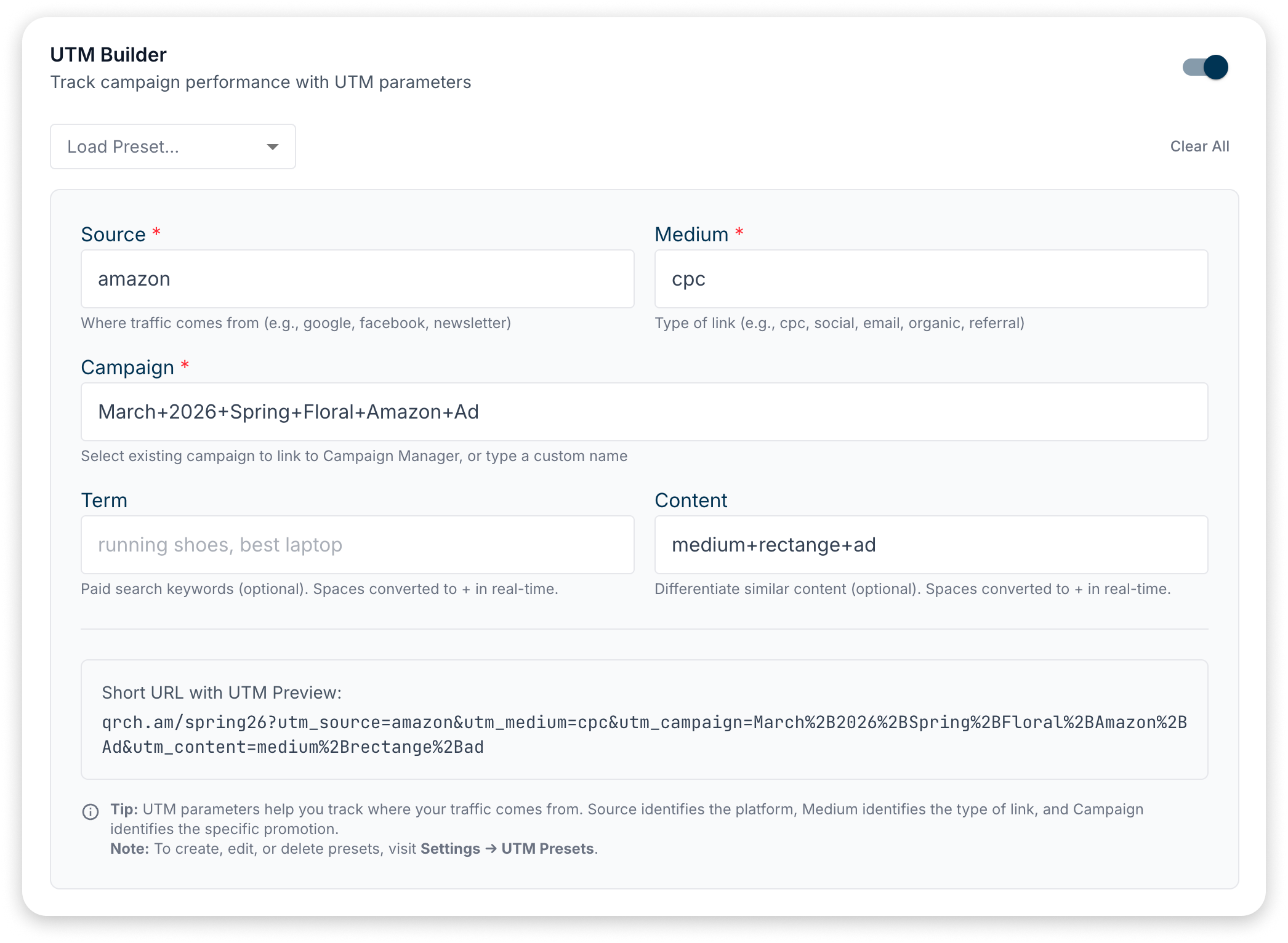
You can also save UTM presets for campaigns you run repeatedly, so you’re not re-entering the same parameters every time. This feature is available on Adapt plans and above.
Spreadsheet Templates
For teams managing dozens of campaigns, a shared spreadsheet with dropdown menus for source, medium, and campaign values helps maintain consistency. Build the URL with a concatenation formula, then copy it out.
Common UTM Mistakes to Avoid
Inconsistent Naming
If one person tags links with utm_source=Facebook and another uses utm_source=fb, you’ve split your data into two sources. Agree on naming conventions and enforce them.
Tagging Internal Links
When someone clicks a UTM-tagged link on your own site, it starts a new session and overwrites their original source. That visitor who came from your email campaign now looks like they came from your homepage banner. Only use UTM parameters on links pointing to your site from external sources.
Forgetting to Track
UTM parameters require discipline. If you tag 80% of your links, the other 20% become a mystery — and you can’t trust your channel comparisons. Make UTM tagging part of your standard workflow.
Overly Complex Parameters
You don’t need to capture every possible dimension. If your utm_content value is blue_button_above_fold_mobile_version_test_march_15, you’ve gone too far. Keep it useful but manageable.
Using Personal or Sensitive Information
Never put email addresses, names, or other personal data in UTM parameters. They’re visible in the URL and may be logged in various systems. Keep them generic and non-identifying.
UTM Parameters and QR Codes
QR codes add an interesting layer to UTM tracking. When someone scans a QR code on a printed flyer, poster, or product package, how do you know where they scanned it?
UTM parameters solve this.
Create different QR codes for different placements, each with unique UTM values:
utm_source=flyer&utm_medium=print&utm_campaign=store_opening&utm_content=downtown_locationutm_source=poster&utm_medium=print&utm_campaign=store_opening&utm_content=mall_entranceNow you can compare performance across physical locations. Which poster placement drove the most scans? Which flyer distribution method worked best?
If you’re using dynamic QR codes, you get this tracking automatically. The QR code points to a short link, and every scan is logged with timestamp, location, and device data — even before the redirect to your final destination. Combined with UTM parameters flowing into Google Analytics, you get a complete picture of your offline-to-online conversion path.
For a deeper dive into the differences, see our guide on static vs. dynamic QR codes.
Frequently Asked Questions
UTM stands for Urchin Tracking Module. It’s named after Urchin Software, the web analytics company that Google acquired in 2005 to build Google Analytics. The UTM tracking system they developed became the industry standard.
utm_source identifies the platform or website sending traffic to you. Common values include google, facebook, newsletter, linkedin, or any other traffic origin you want to track.
No. UTM parameters don’t affect your search rankings. Google ignores them when indexing pages. However, sharing URLs with visible UTM parameters can look messy in social posts — which is one reason marketers use link shorteners.
In Google Analytics 4, go to Reports → Acquisition → Traffic Acquisition. You can add secondary dimensions for campaign, source, medium, and content to see your UTM data broken down by each parameter.
Yes. The best approach is to add UTM parameters to your destination URL, then create a short link pointing to that tagged URL. The short link stays clean and readable, while the full URL with UTM parameters loads behind the scenes. QR Chameleon handles this automatically — just add your UTM parameters in the link creation flow.
When you create a QR code with QR Chameleon, you can add UTM parameters to your destination URL. Each scan is tracked both in QR Chameleon’s analytics dashboard and in Google Analytics (via the UTM data). This gives you two layers of tracking data.
Start Tracking Your Campaigns
UTM parameters transform your analytics from vague traffic counts into precise campaign intelligence. The five minutes it takes to tag your links properly saves hours of guessing which campaigns actually work.
If you’re creating short links or QR codes for your campaigns, QR Chameleon’s built-in UTM builder lets you add tracking parameters without juggling multiple tools. Your links stay short, your QR codes stay clean, and your analytics finally tell you the truth about what’s working.
Ready to track your campaigns properly? Create your first UTM-tagged short link — free to start. See all features or check out our pricing.