

How do QR codes work? You point your phone camera at a black-and-white square and — almost instantly — a website opens, a WiFi network connects, or a contact saves to your phone. It feels like magic, but the technology behind it is surprisingly elegant and straightforward.
QR codes were invented in 1994 by a Japanese company called Denso Wave to track car parts during manufacturing. The “QR” stands for “Quick Response” — and that speed is exactly what makes them useful. Unlike traditional barcodes that store a few dozen characters, QR codes can hold thousands of characters and be read in milliseconds from any angle.
This guide explains how QR codes work in plain language — no computer science degree required. By the end, you’ll understand exactly what’s happening every time you scan one.
What Is a QR Code?
A QR code is a two-dimensional barcode that stores information in a grid of black and white squares called modules. Traditional barcodes (the kind on grocery products) are one-dimensional — they store data in a single row of lines. QR codes store data in both horizontal and vertical directions, which is why they can hold much more information in a smaller space.
Each QR code can encode several types of data:
- URLs — website addresses (the most common use)
- Plain text — messages, notes, or instructions
- Contact information — vCards that save directly to your phone (business card QR codes)
- WiFi credentials — network name, password, and encryption type (WiFi QR codes)
- Email addresses — pre-filled email drafts
- Phone numbers — tap to call
- Geographic coordinates — open a location in Maps
The maximum data capacity depends on the type of content. A QR code can hold up to 7,089 numeric characters, 4,296 alphanumeric characters, or 2,953 bytes of binary data. In practice, most QR codes encode a short URL — typically under 100 characters.
The Anatomy of a QR Code
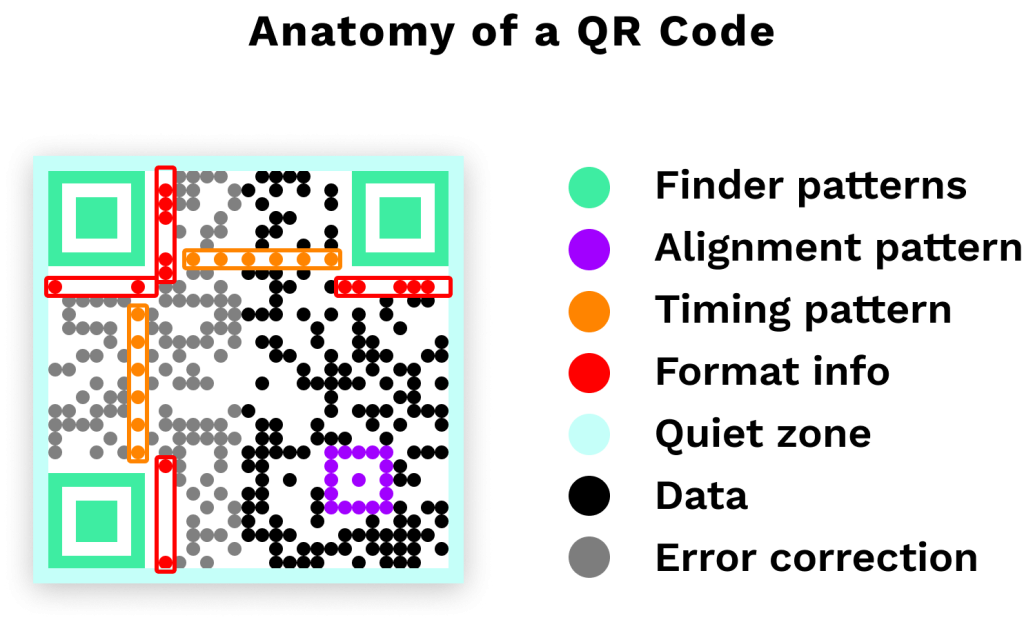
Every QR code has the same basic structure, regardless of what data it contains. Understanding these components helps explain how your phone reads the code so quickly.
Finder Patterns (The Three Big Squares)
The most recognizable feature of any QR code is the three large squares in the corners — top-left, top-right, and bottom-left. These are called finder patterns, and they serve one critical purpose: they tell your phone’s camera “this is a QR code, and here’s how it’s oriented.”
Because there are exactly three finder patterns (not four), the scanner can immediately determine the code’s rotation and angle. This is why QR codes work even when you scan them sideways, upside down, or at an angle — something traditional barcodes can’t do.
Alignment Pattern
Larger QR codes include a smaller square pattern near the bottom-right corner. This alignment pattern helps the scanner correct for distortion — like when you’re scanning at an angle or the code is printed on a curved surface.
Timing Patterns
Between the finder patterns, you’ll notice alternating black and white modules in a straight line. These timing patterns help the scanner determine the size of the data grid — essentially telling it how many rows and columns of modules to expect.
Format and Version Information
Small strips of data near the finder patterns encode the code’s error correction level and version number (which determines the grid size). There are 40 QR code versions — Version 1 is a 21×21 grid, and Version 40 is a massive 177×177 grid.
Data and Error Correction Modules
Everything else — the seemingly random pattern of black and white squares or other shapes — is the actual data, encoded alongside error correction information. The error correction is what makes QR codes so resilient. Even if part of the code is damaged, dirty, or covered (by a logo, for example), the scanner can still reconstruct the missing data.
How Your Phone Reads a QR Code
When you point your phone camera at a QR code, here’s what happens — all within a fraction of a second:
- Detection — The camera identifies the three finder patterns, confirming it’s looking at a QR code and determining its orientation
- Grid mapping — Using the timing patterns, the scanner maps out the grid and identifies each individual module (black = 1, white = 0)
- Format decoding — The scanner reads the format information to determine the error correction level and data encoding method
- Data extraction — The binary data (the 1s and 0s from each module) is read in a specific zig-zag pattern across the grid
- Error correction — The scanner uses Reed-Solomon error correction to verify the data and fill in any missing or damaged sections
- Decoding — The raw binary data is converted into readable text — a URL, phone number, WiFi credentials, or whatever was encoded
- Action — Your phone performs the appropriate action: opening a browser, connecting to WiFi, saving a contact, etc.
This entire process takes less than a second. Modern smartphone cameras are optimized for QR code detection — both iPhone (iOS 11+) and Android (9+) can scan QR codes natively through the default camera app, with no special app required.
Error Correction: Why QR Codes Still Work When Damaged
One of the cleverest features of QR codes is their built-in error correction. The technology uses an algorithm called Reed-Solomon error correction — the same math used to protect data on CDs, DVDs, and satellite communications.
There are four error correction levels:
| Level | Recovery Capacity | Best For |
|---|---|---|
| L (Low) | ~7% damage | Clean environments, digital displays |
| M (Medium) | ~15% damage | General use (the default for most generators) |
| Q (Quartile) | ~25% damage | Industrial use, outdoor signage |
| H (High) | ~30% damage | Codes with logos, harsh environments |
This is why you can place a logo in the center of a QR code and it still scans — the error correction compensates for the “damaged” area. However, higher error correction means more data is dedicated to redundancy, which makes the code pattern denser. That’s the trade-off: more resilience means a more complex (and slightly harder to scan) code.
Create Your Own QR Code in Seconds
Use the Try it Free widget in the bottom-right corner to get started. No credit card required.
Create Your Free QR CodeStatic vs. Dynamic QR Codes: Two Different Approaches
Now that you understand how QR codes encode data, there’s an important distinction that affects how they’re used in practice. Not all QR codes work the same way behind the scenes.
Static QR Codes
A static QR code encodes the destination data directly into the pattern. The URL, text, or contact info is literally baked into the arrangement of black and white modules. Once created, it can never be changed — the data is the code.
This makes static codes simple and independent (no server required), but inflexible. If you print 1,000 flyers with a static QR code and the URL changes, those flyers are useless.
Dynamic QR Codes
A dynamic QR code takes a different approach. Instead of encoding your final URL directly, it encodes a short redirect URL (like qrch.am/abc123). When someone scans it, they hit the redirect server first, which instantly forwards them to your actual destination.
This architecture gives you two major advantages:
- Editable destinations — change where the code points anytime, without reprinting
- Scan analytics — the redirect server logs every scan (time, location, device, browser)
Additionally, because the encoded URL is always short, dynamic QR codes produce cleaner, less dense patterns — making them easier to scan and leaving more room for customization like colors and logos.
For a detailed comparison of when to use each type, read our full guide on static vs. dynamic QR codes.
QR Codes vs. Traditional Barcodes
Traditional barcodes (UPC codes on products) and QR codes solve similar problems — encoding data in a scannable visual format. But the differences are significant.
| Feature | Traditional Barcode | QR Code |
|---|---|---|
| Dimensions | 1D (horizontal lines) | 2D (grid of squares) |
| Data capacity | ~20-25 characters | Up to 7,089 characters |
| Data types | Numbers only | Numbers, text, URLs, binary |
| Scan angle | Must be straight-on | Any angle, any rotation |
| Error correction | None | Up to 30% damage recovery |
| Scanner required | Dedicated barcode scanner | Any smartphone camera |
| Common use | Product identification, inventory | Marketing, payments, information sharing |
The key advantage of QR codes is accessibility. Anyone with a smartphone can scan one — no special hardware needed. This is why they’ve become the standard for consumer-facing applications like restaurant menus, payment codes, and event materials.
Why QR Codes Are So Fast
The “Quick Response” name isn’t marketing — it’s engineering. Several design decisions make QR codes genuinely fast to read:
- Finder patterns provide instant orientation — the scanner doesn’t need to search for the “start” of the data like with a barcode
- Binary encoding is efficient — each module is a simple yes/no (black/white) decision, which computers process extremely fast
- Multiple encoding modes — QR codes automatically choose the most efficient encoding for the data type (numeric, alphanumeric, byte, or Kanji), minimizing the number of modules needed
- Parallel processing — modern smartphones process the image recognition and data decoding simultaneously
The result: a typical QR code scan takes between 100 and 300 milliseconds from camera detection to decoded data. That’s faster than you can blink.
How to Create a QR Code
Now that you understand how QR codes work, creating one is simple:
- Use the “Try it Free” widget in the bottom-right corner of this page — select QR Code, paste any URL, and click Create QR Code
- Create your free account — takes 10 seconds, no credit card required. You’ll land directly in the QR code editor
- Customize the design — change colors, dot patterns, and add a logo. The error correction handles the visual changes
- Download as SVG for print (scales to any size) or PNG for digital use
Every QR code created with QR Chameleon is dynamic by default — meaning you get editable destinations, scan analytics, and a clean code pattern on every QR code, including the free plan.
Common QR Code Myths
“You need a special app to scan QR codes”
Not anymore. Every iPhone running iOS 11 or later (2017+) and every Android phone running Android 9 or later (2018+) can scan QR codes with the default camera app. Just launch your camera app, point and scan — no download needed.
“QR codes are dangerous”
QR codes themselves are neutral — they’re just data containers. The risk comes from what’s encoded inside, the same way a link in an email can be safe or malicious. Always check the URL preview before visiting an unfamiliar QR code. For a deeper dive, read our guide on QR code scams and how to stay safe.
“All QR codes look the same”
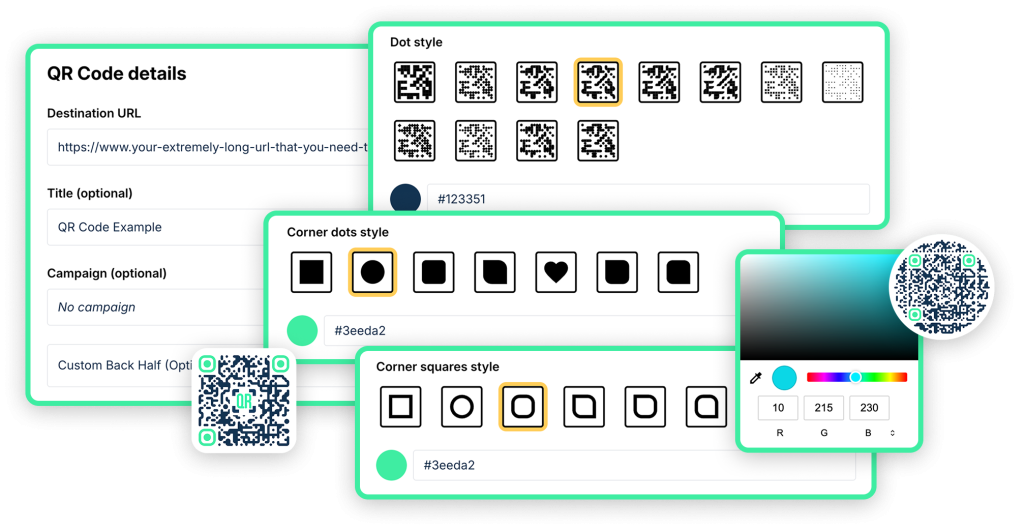
Modern QR codes can be heavily customized — different colors, dot shapes, rounded corners, embedded logos, and even gradient effects. As long as sufficient contrast exists between the modules and background, the code will scan. Many businesses match their QR codes to brand colors for a professional look.
“QR codes expire”
Static QR codes never expire — the data is permanently encoded. Dynamic QR codes from QR Chameleon also remain active even if you downgrade or stop paying — your existing codes keep working. They would only stop working if you delete your account entirely. Neither type has a built-in expiration date unless you specifically set one.
Ready to create your own QR codes?
Start for free — no credit card required.
Create Your Free Account NowQR Code Use Cases in 2026
Understanding how QR codes work helps you see why they’ve become so widespread. Here are the most common applications today:
- Contactless menus — 75% of full-service restaurants now use QR code menus
- Mobile payments — Venmo, Cash App, and other payment platforms use QR codes for instant transfers
- Business networking — vCard QR codes on business cards save contact info with one scan
- Real estate — agents use QR codes on yard signs to connect buyers with listing details instantly
- Events and weddings — wedding QR codes for RSVPs, photo sharing, and seating charts
- WiFi sharing — WiFi QR codes eliminate the need to spell out passwords
- Customer reviews — Google review QR codes make it frictionless for customers to leave feedback
- Marketing analytics — UTM-tagged QR codes track which physical materials drive the most engagement
According to recent statistics, the global QR code market is projected to reach $33.13 billion by 2030, with QR code payment transactions alone expected to exceed $5.3 trillion by 2026.
QR Code FAQs
How does a QR code work technically?
A QR code stores data in a 2D grid of black and white squares called modules. Black modules represent binary 1s and white modules represent 0s. When your phone camera detects the three finder patterns (the big squares in the corners), it maps the grid, reads the binary data in a zig-zag pattern, applies error correction to fix any damaged sections, and decodes the result into readable data like a URL or contact information.
Do QR codes work without internet?
It depends on the type. Static QR codes that encode text, WiFi credentials, or contact information work without internet u0026mdash; the data is read directly from the code. However, QR codes that encode URLs require internet to load the destination website. Dynamic QR codes also require internet because they use a redirect server.
Can QR codes be hacked?
QR codes themselves cannot be hacked u0026mdash; they are just data printed in a visual format. However, a malicious QR code can encode a phishing URL, just like a malicious link in an email. The risk is in what the code links to, not the code itself. Always check the URL preview before visiting. For more details, see our QR Code Scams guide on the blog for more details.
Why do QR codes have three squares in the corners?
The three finder patterns tell the scanner where the code is and how it is oriented. Because there are exactly three (not four), the scanner can determine the code’s rotation instantly. This is why QR codes work from any angle u0026mdash; sideways, upside down, or tilted.
How much data can a QR code hold?
Up to 7,089 numeric characters, 4,296 alphanumeric characters, or 2,953 bytes of binary data at maximum capacity (Version 40, 177×177 grid). In practice, most QR codes encode short URLs under 100 characters, which keeps the pattern simple and easy to scan.
Do all phones scan QR codes automatically?
Yes u0026mdash; all modern smartphones do. iPhones running iOS 11+ (2017) and Android phones running Android 9+ (2018) scan QR codes natively through the default camera app. No third-party app is needed.
What is the difference between a QR code and a barcode?
Traditional barcodes are one-dimensional (horizontal lines) and hold about 20 to 25 characters of numeric data. QR codes are two-dimensional (a grid of squares) and hold up to 7,089 characters of any data type. QR codes also include error correction, work from any scan angle, and can be read by any smartphone camera.
Can I create a QR code for free?
Yes. QR Chameleon’s free plan includes 2 dynamic QR codes per month with custom styling and scan analytics. Every code is dynamic by default u0026mdash; editable destinations, scan tracking, and clean code patterns. No credit card required.
Now that you know how QR codes work, why not create one? QR Chameleon lets you generate dynamic QR codes with custom designs and scan analytics — free, no credit card required.